WhatsApp has implemented a feature that allows iPad users to create accounts using usernames, meaning the profile will no longer be directly linked to the phone number. This addition is part of a larger set of improvements to the application.
WhatsApp has implemented a feature that allows iPad users to create accounts using usernames, meaning the profile will no longer be directly linked to the phone number. This addition is part of a larger set of improvements to the application.
With this new option, iPad owners can establish an account based on a username, following a common standard in various social networks and other messengers. Although the phone number remains necessary during the registration process to receive the verification code, the account generated on the tablet will no longer function as a simple extension linked to the mobile device.
This release comes after the availability of the official WhatsApp application for iPad, which had been awaited for 15 years since the launch of the Apple tablet.
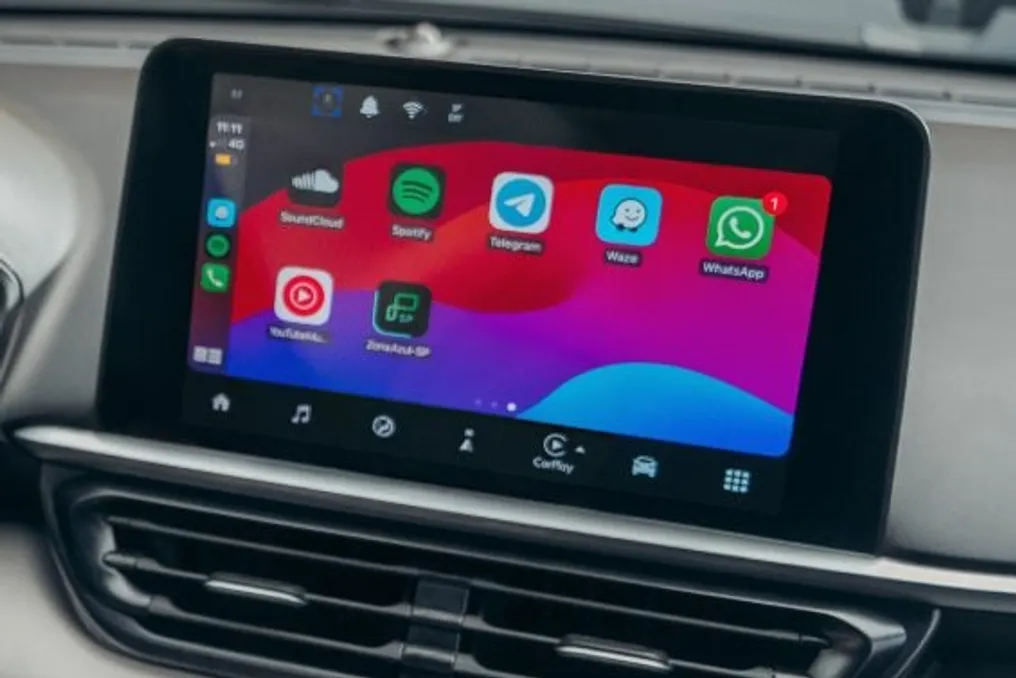
Furthermore, WhatsApp has updated its integration with both Android Auto and Apple CarPlay. The version intended for vehicles no longer relies exclusively on voice commands, but now displays a wider range of functionalities on the vehicle's screen.
The new capabilities include viewing call history, accessing favorite contacts, the ability to check conversations, and reading unread messages. Additionally, a feature allows users to view and edit PDF files directly within the app, thanks to integration with Adobe Acrobat.
Users have also gained a renewed way to customize their statuses. It is now possible to incorporate music tracks from Apple Music or Spotify into status posts.
In summary, these modifications expand the features offered by WhatsApp to users who use the service in various contexts, whether on the tablet, while driving, or when sharing content.
On Wednesday, the 22nd, WhatsApp announced a set of updates that expands the application's presence across various platforms, from vehicle multimedia systems to the iPad.
For those who are driving, the major highlight is the redesign of the 'Zap' experience on Apple CarPlay and Android Auto systems. This change aims to simplify the use of the application without requiring the driver to take their hands off the steering wheel, especially when dealing with voice messages.
With the new functionality, the driver can listen to and reply to voice messages directly on the car screen, in addition to listening to audio, making and receiving calls, checking call history, and accessing favorite contacts—all in a completely hands-free mode, without needing to touch the device. Meta, the company that owns the application, has as its main objective to reduce the need to manipulate the phone while driving.
According to WhatsApp, these features were initiated this Wednesday (22nd) and will be gradually implemented in the coming days, meaning the availability of the new features will not be immediate for all users. It is important to note that the vehicle experience depends on the car being compatible with Apple CarPlay or Android Auto.
In addition to the automotive improvements, three new features have been introduced. The first allows creating a WhatsApp account directly on the Apple iPad, eliminating the need to link a mobile phone to the tablet.
The second feature is integration with Adobe Acrobat. On WhatsApp Web and the desktop version, users can view PDF files within conversations without having to download them, allowing for light edits, such as underlining parts or adding annotations. However, to use the most advanced features, an Acrobat Pro subscription is required, which costs R$ 55 monthly.
Finally, a music sharing function was added, which facilitates sending tracks from Spotify or Apple Music directly to the Status, allowing contacts to know what the user is listening to.
It is possible to remove photos and videos from an individual chat or a group on WhatsApp for both Android and iPhone devices. The procedure involves selecting the desired conversation in the 'Chats' tab of the app and then accessing the 'Clear chat' functionality, choosing the types of media you wish to delete.
This cleaning action serves to optimize the device's storage space by eliminating the accumulation of large files received daily. Thus, it ensures faster operating system performance without losing text messages.
For Android users, the process begins by opening WhatsApp and long-pressing the chat or group whose media needs to be removed from internal storage. Subsequently, you must tap the three-dot icon in the upper right corner and select the 'Clear chat' option. You only need to check the 'Media files only' option and specify which types of media will be deleted. Finally, by clicking 'Clear media', the photos and videos are deleted from the conversation.
On the iPhone, the user must start the process by opening WhatsApp and long-pressing the individual or group conversation to free up space. Next, they must access 'Clear chat' and select the 'Clear media files' option for the chat. After checking the media categories you wish to eliminate from internal storage, the user must tap 'Clear all media' to remove only photos and videos from the group or chat.
WhatsApp does not offer a native function that allows exclusively deleting photos and videos from all conversations or groups simultaneously. Therefore, the cleaning must be done individually, selecting each chat separately. However, there is an alternative for managing space: go to Settings, then 'Storage and data', navigate to 'Manage storage', and finally review and delete the heaviest items.
In case of accidental deletion of photos or videos on WhatsApp, it is possible to recover them if there is a recent cloud backup of the data. The most direct way is to restore the WhatsApp backup associated with Google Drive on Android or iCloud on iPhone. If no recent backup is available, it is recommended to check the phone gallery's trash bin or ask the contact to resend the material, while advising against using unofficial third-party solutions to maintain account security.