
WhatsApp officially launches message scheduling feature for users
Read more
Tecnoblog
tecnoblog.net

WhatsApp officially launches message scheduling feature for users

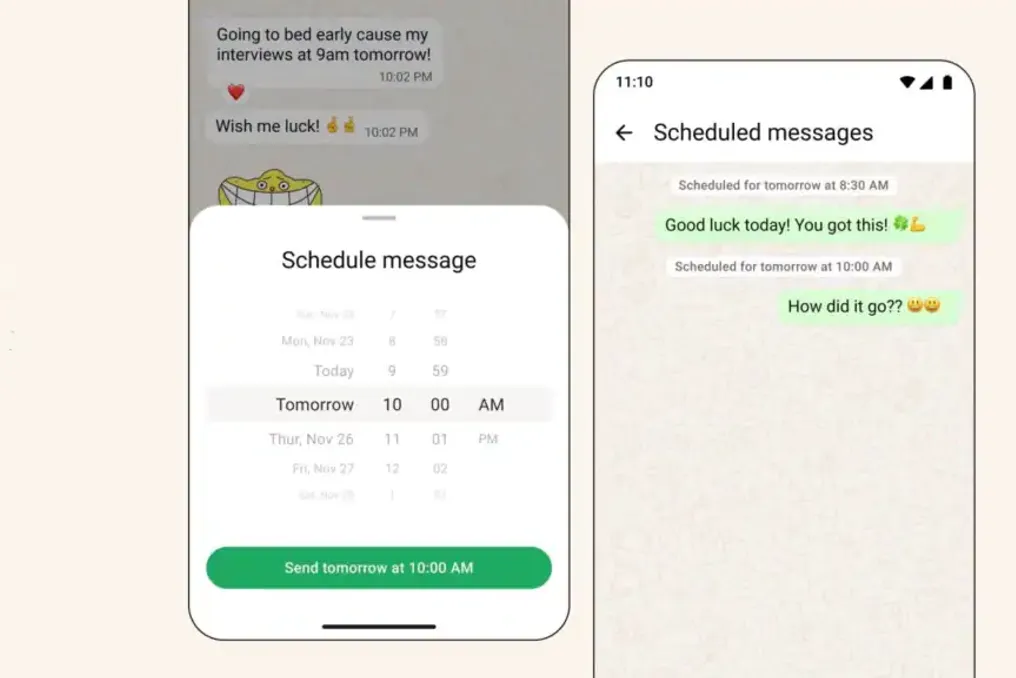
After a testing period, WhatsApp has made the message scheduling functionality official. This feature allows users to compose a message intended for a contact or group but schedule its sending for a specific date and time. While waiting for the set moment, the message remains in a queue to be dispatched.

The new feature establishes a minimum waiting period of ten minutes and a maximum of fourteen days for scheduling. When the message is delivered to the recipient, it will appear as a standard send, without any highlights or labels, ensuring that the contact does not notice that the content was previously scheduled.

A relevant aspect is that if the user wishes to modify or cancel the message before sending, they have the option to edit or delete it at any time. In addition to text, messages can include photos and videos, and in all situations, end-to-end encryption remains active.

To use the feature, simply access a contact's profile or a group, write the message, and hold down the send button for a few seconds. Subsequently, WhatsApp will present a calendar where the user can select the desired date and time, respecting the established limits.

Scheduled messages will be sent even if the mobile device is turned off or without an internet connection, as the sending process is managed by the application's servers. The scheduling is being released globally for both the Android and iPhone versions, although availability is implemented gradually, which may take a few weeks to reach every account.

As of now, there are no official announcements regarding the inclusion of this feature in the service's desktop versions, but it is known that the function had already been tested on WhatsApp Web, which operates through a browser.

Similar stories

WhatsApp makes message scheduling feature available for Android and iPhone users
Read more
olhardigital.com.br

WhatsApp makes message scheduling feature available for Android and iPhone users

WhatsApp has started the global release of the message scheduling feature for both private conversations and groups. This functionality is now accessible to users of Android and iPhone (iOS) devices, allowing sends to be scheduled in advance ranging from 10 minutes up to 14 days.

Although this feature was already available to some users in Brazil, access was previously limited to certain accounts and platforms. Currently, Meta is expanding the distribution of this tool to a wider reach.

To set up a scheduled send, the user must write the message and then press and hold the send icon. The application offers the option to select the exact date and time for delivery. This feature supports different types of content, including texts, photos, and videos.

A relevant aspect is that messages will be delivered even if the device is turned off or without network connection at the scheduled time. Furthermore, recipients will not receive any notification indicating that the content was scheduled; the message will appear as a standard send.

Users have the option to view scheduled messages in the information section of each conversation and remove them before the send occurs. However, it is unclear whether it will be possible to change the date or time of an already established schedule.

According to WhatsApp, all sends maintain end-to-end encryption, ensuring that third parties, including the company itself, cannot read the message content.

In group environments, there is a specific rule: only members who were part of the conversation when the scheduling was done will receive the message. People who join the group later will not have access to this pre-scheduled send, according to WABetaInfo.

Previously, Olhar Digital reported that WhatsApp was beginning to offer the function of scheduling messages for specific days and times to some users in Brazil. At that time, tests allowed scheduling multiple messages via WhatsApp Web and, for some accounts, through the iPhone app. That publication also pointed out restrictions related to the minimum lead time, available dates, and accepted formats. Meta had not yet confirmed whether such limitations would be maintained in the final version. With the global distribution, the feature also began to include Android users.

It is important to note that Telegram and Signal have had message scheduling available for a longer period, with WhatsApp being one of the last to incorporate this functionality among its competitors.

WhatsApp begins rolling out message scheduling feature to users in Brazil
Read more
olhardigital.com.br

WhatsApp begins rolling out message scheduling feature to users in Brazil

WhatsApp has started making available the functionality that allows users to schedule message sending for specific dates and times on some accounts in Brazil. Although the new feature is already present in some accounts, a date for the full release to all users has not yet been set.

Meta has not yet provided details on how the feature will be distributed nor communicated when its release will be expanded. According to WABetaInfo, a portal that predicts app updates, global-scale tests began in October, using the beta version of WhatsApp for iPhone, a mode intended to test features before the general release.

In the Brazilian context, this option started being seen by certain users at the beginning of November. The accessibility of this functionality depends both on the platform and the account being used; in some situations, the option only appears on WhatsApp Web, while other users can already use it directly through the iPhone application.

On WhatsApp Web, the procedure requires the user to write the message in the input field and subsequently click the clock icon. Then, it is necessary to select the desired date and time for sending. The system allows multiple messages to be scheduled.

After confirming the scheduling, a notification with the phrase 'You have scheduled a message' is displayed in the conversation, visible only to the person who scheduled it. By interacting with this notice, the user can check the content that was scheduled. To cancel the sends, simply select the messages on this same screen and proceed to delete them.

During practical tests, three restrictions were identified in the tool, although Meta has not yet clarified whether these limitations will be maintained in the final version of the application.

WhatsApp increases group participant limit to 1500; update will happen automatically
Read more
www.aajtak.in

WhatsApp increases group participant limit to 1500; update will happen automatically

WhatsApp has announced a significant change to the group participant limit, now allowing up to 1500 members. This feature is available on both Android and iPhone platforms and applies to both regular groups and Community Groups.

Previously, the maximum number of participants in WhatsApp was limited to 1024 members. This forced users to create additional groups for large gatherings. Now, considering user needs, WhatsApp has increased this limit, which is particularly relevant for family, school, community, and other large groups where the number of participants often exceeds a thousand.

WhatsApp stated that the new feature increasing group capacity will be updated automatically. Users will not need to make any changes to their settings, and this capability will gradually become available to a wide range of users in the near future.

In addition to the limit increase, last month WhatsApp introduced four new tools for group management. These features allow for better control over communication and receiving important updates within the group.

One of the innovations is the ability to pin messages for an extended period. Users can pin an important message in the chat by placing it at the very top. Users can also now share their status updates directly within the group. Additionally, a chat filtering function based on mentions and replies has been added.

Another significant feature is that new members joining a group will be able to view the history of old messages. Thus, when joining a group, a new member will gain access to selected previous messages.

Popular