Samsung has introduced a native feature in One UI 9.5 that allows for the individual blocking of applications on the brand's devices. This functionality aims to assist users who wish to restrict unauthorized individuals from accessing private information.
This new feature was initially made available in the operating system's Beta program for the Galaxy S26 line and is expected to be gradually implemented on other compatible devices, according to information released by the SamMobile website.
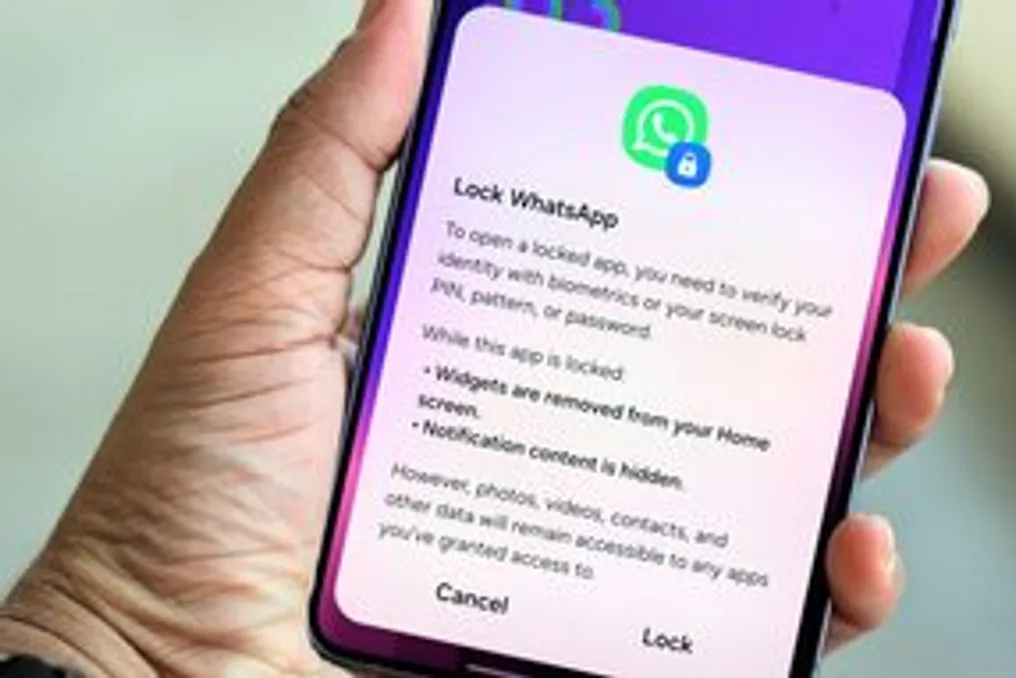
App Lock requires the same authentication method used to unlock the phone to be employed to access the blocked applications. This makes the function useful in situations where the device is handed over unlocked to third parties, but the user wants to prevent access to sensitive services, such as banking apps, messaging, or photo galleries.
In addition to protecting content, the lock also hides application notifications and causes corresponding widgets to disappear from the home screen once protection is activated.
It is important to note that not all applications can be protected. App Lock works with both third-party software and most applications developed by Samsung itself, including Gallery and My Files. However, programs such as Phone, Contacts, and Galaxy Store are listed among the exceptions.
On the Galaxy S26 Ultra model, Samsung incorporated this novelty into the Privacy Display, allowing side-view protection to be automatically activated whenever a blocked application is opened.
There are two ways to apply application blocking using App Lock in the One UI 9.5 version. The quickest method consists of pressing and holding the application icon on the home screen or app drawer and then tapping the padlock icon. Alternatively, through settings, the user can manage multiple applications simultaneously by accessing the 'Security and privacy' section to view the list of compatible apps and define protection for each one.
It should be noted that App Lock does not replace Secure Folder, a feature offered by Samsung on Galaxies since 2017. While the new tool requires authentication before opening an application from the standard profile, Secure Folder establishes an encrypted and isolated environment via Samsung Knox. Applications placed in this folder operate as autonomous copies, possessing their own data, logins, and files, which allows, for example, keeping separate accounts of the same service on the regular phone and in the Secure Folder, thereby increasing privacy.