Kunal Shah presents WhatsApp plans for integrating artificial intelligence, payments, and enriching communication
Read more
YourStory [india, en]
yourstory.com

Kunal Shah presents WhatsApp plans for integrating artificial intelligence, payments, and enriching communication

WhatsApp is preparing to move beyond simple messaging, aiming to make communication more expressive, integrate everyday financial transactions into the app, and utilize artificial intelligence (AI) to perform practical tasks. WhatsApp's global head, Kunal Shah, outlined these priorities in a post on the social network X, more than four months after he took over from Will Cathcart.

Shah noted that the application will evolve alongside users' changing habits regarding voice notes, groups, stickers, and videos. WhatsApp has over three billion users worldwide, with India being its largest market, where over 500 million users are registered. According to Shah, users send over 10 billion voice messages and 4 billion stickers daily, and the platform processes over 100 billion messages and 2 billion calls.

Kunal Shah stated that the company's goal is to make all user actions in WhatsApp as simple as sending a message. The second objective is to simplify performing daily tasks directly within the chat. The company is collaborating with partners in the financial services and telecommunications sectors to reduce the number of steps required for bill payments, loan applications, and staying connected while traveling.

This expansion process is already underway in India. In April, WhatsApp began offering prepaid mobile top-ups for Jio, Airtel, and Vi operators, and in September, it announced the phased implementation of bill payments through Bharat Connect—a network connecting service providers with payment providers. Meta reported that this service will provide access to 22,722 service providers across 30 categories, including electricity, water, insurance payments, and loan repayments. In October, the UPI system processed approximately 254.7 billion transactions, demonstrating the scale of the digital payments market.

The third direction is AI. Shah believes that AI should help users find necessary information, manage routine tasks, and prevent missing appointments or meetings, although he did not disclose details or timelines for new consumer features. In May, Meta launched Business AI for eligible small businesses in India, allowing them to automate responses, suggest products, and handle appointment bookings in local Indian languages. Furthermore, the company announced the upcoming integration of UPI payments within AI-supported chats.

Similar trends are observed in the broader industry context. In May, Google and Apple began beta testing end-to-end encrypted RCS messaging between compatible Android and iPhone devices. Meanwhile, Reuters reported in September that NPCI is developing a registry to verify AI agents making payments via UPI, raising questions about user consent and accountability when software acts on behalf of a client.

Trust remains critically important. Shah emphasized that personal calls and messages will retain end-to-end encryption. He wrote: 'Trust is earned over years and lost in a moment, and I take this very seriously.' As WhatsApp adds financial and AI services, it needs to explain how payment information and automated functions are handled alongside private conversations. Shah concluded: 'The best technology saves your time so you can get back to important connections.'

Similar stories

WhatsApp tests AI feature that expands photos and automatically fills backgrounds
Read more
olhardigital.com.br

WhatsApp tests AI feature that expands photos and automatically fills backgrounds

WhatsApp has started rolling out a generative artificial intelligence feature aimed at expanding the framing of photographs before they are sent. This feature was developed in collaboration with Meta AI and allows images to be adapted to the 9:16 vertical format, ideal for content that fully fills mobile device screens.

Currently, this new feature is being made available progressively to users who are part of the beta programs for both Android and iOS systems. Unlike simply stretching or cropping the photo, the system performs a detailed analysis of the scene and then creates new visual elements in the border areas.

This artificial intelligence generates complements that harmonize with the original setting, such as extensions of the floor, the sky, or the walls of an indoor environment. To use the tool, the user must select an image from the gallery to share in a conversation or post to Status, activate the pencil icon in the image editor to access the AI options. WhatsApp then displays a preview in a few seconds, allowing the user to approve it or choose another suggestion generated by the system.

The function is primarily optimized for photos that have square or horizontal formats; when the image is already in vertical format, the expansion option will not be displayed. The distribution of the test varies among participants, according to the specialized website WABetaInfo.

Specifically, on Android, the functionality was detected starting from version 2.26.44.8 of the WhatsApp beta, which was distributed through the Google Play Store. On iPhone, the tool is being released to participants in the iOS testing program via TestFlight. The implementation follows a gradual schedule, and not all participants have access to the same functionalities. Meta has not yet announced a definitive date for making this function available to all users of the stable version of the application.

WhatsApp implements function that converts numbers, addresses, and dates into interactive shortcuts
Read more
olhardigital.com.br

WhatsApp implements function that converts numbers, addresses, and dates into interactive shortcuts

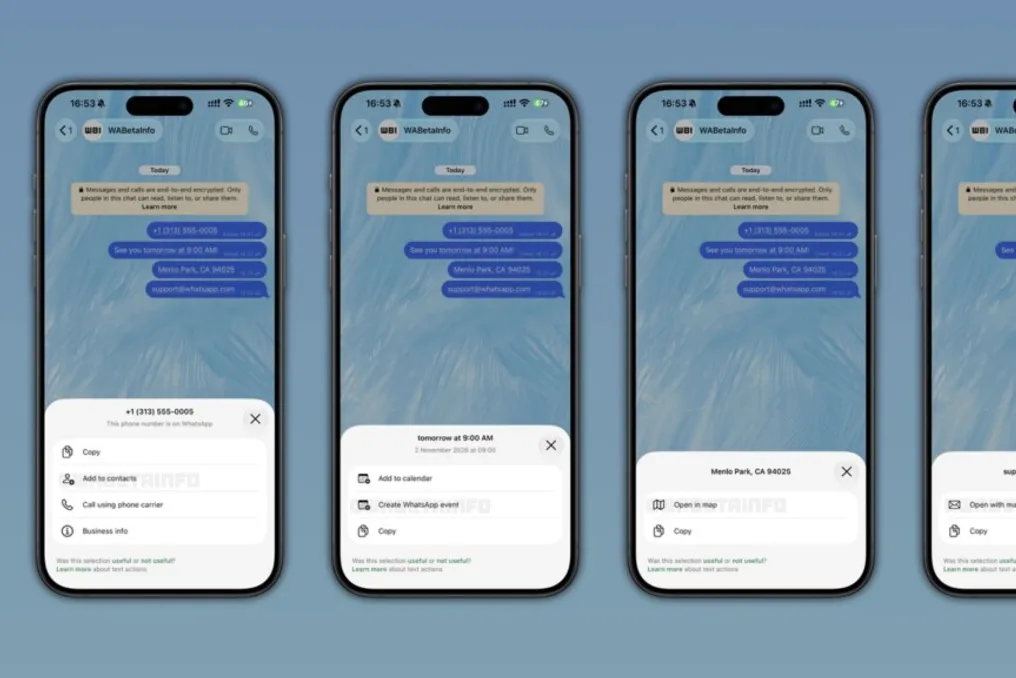
WhatsApp is introducing a new feature designed to simplify daily activities. This functionality can automatically detect various types of shared data in conversations, such as phone numbers, dates, times, addresses, and emails, offering direct shortcuts to interact with this information without leaving the application itself.

This feature, called 'message text actions,' is being rolled out progressively to users on Android and iPhone devices. The discovery of this novelty was made by the specialized portal WABetaInfo, analyzing recent versions of the app.

When the app's system recognizes compatible data, it inserts a dotted underline beneath the corresponding segment. By clicking on this highlighted text, the user accesses a menu containing specific options related to the identified content.

The functionality works for both received and sent messages. Furthermore, the menu will display the recognized text segment, allowing the user to verify if WhatsApp identified the information correctly. If the user chooses not to use any of the suggestions, they can simply ignore the highlight and continue the conversation normally.

The presented options vary depending on the type of content detected. Although some of these actions already existed in previous versions of WhatsApp, the main change lies in consolidating them into a contextual menu, which facilitates access to the available functionalities.

Regarding security and privacy, WABetaInfo highlighted that the recognition of this text occurs entirely on the device, using regular expressions—patterns employed to identify specific data formats. Consequently, message content and action suggestions are not transmitted to WhatsApp servers, ensuring that the new function does not affect the end-to-end encryption of conversations.

The application also offers the possibility of rating the suggestions. After selecting an action, the user can indicate whether it was useful or not. It is possible to provide feedback if the identification is incorrect or the option is considered unnecessary. According to WABetaInfo, this rating sends only a signal to the platform, without exposing the message content.

Text actions are being released gradually to certain users of the latest versions of WhatsApp, for both Android and iOS. This implies that not everyone will immediately see the dotted underlines, even after updating the software. WABetaInfo reports that the rollout should reach more accounts in the coming weeks, but WhatsApp has not yet announced a definitive date for making the feature available to all users.

WhatsApp introduces four new features: permanent pinning of messages and statuses in groups
Read more
www.aajtak.in

WhatsApp introduces four new features: permanent pinning of messages and statuses in groups

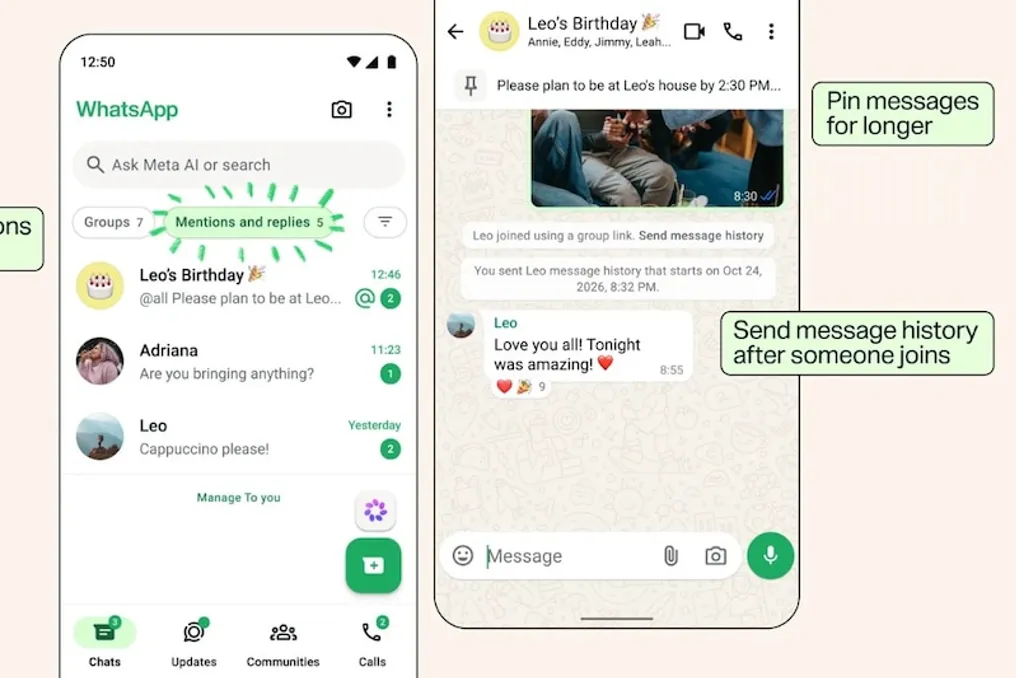
WhatsApp has released a major update for millions of users, focusing on enhancing the functionality of group chats. It is now possible to pin important messages without time limits. Additionally, users can share statuses separately for members of specific groups. New capabilities for viewing old messages and filtering notifications have also been added.

WhatsApp has implemented four new tools for group chats. These changes are aimed at solving problems for users who belong to many groups—whether they are family, friends, or work-related. Often, critically important information gets lost among a large volume of messages, and new members can find it difficult to understand the flow of previous discussions.

When important information appears in a group chat—such as a wedding address in a family group, a meeting link in an office group, or a travel plan in a friends' group—it is quickly overlooked due to the stream of new messages. To solve this problem, WhatsApp has added a new option for pinning messages. Previously, users had to choose timeframes for pinning (24 hours, 7 days, or 30 days), after which the message required re-pinning.

Now, a pinned message will remain displayed at the top of the group until the user manually deletes it. This eliminates the need for participants to constantly scroll through old parts of the chat to find necessary information.

The second useful feature is designed for those who join a group later. Typically, a new member is unaware of the previous discussion history and must ask other group members for information or request screenshots. WhatsApp has eliminated this difficulty. Now, if a person joins a group, other members can share the history of recent messages with them by tapping on that member's name in the chat.

It is important to note that using this feature no longer requires removing and re-adding the new member to the group, as was previously the case. Previously, the chat history sharing option was only available at the moment of addition.

The third innovation may change how WhatsApp is used. Until now, users could share their status with specific contacts or privacy lists. However, sometimes it is necessary to show a photo or video only to a small circle of people within a specific group, without showing it to family or colleagues. The new Group Status feature simplifies this process.

Users can now publish a status specifically for members of a certain group. All members of that group will see the status, be able to react to it, and also share their own statuses. This group status will function similarly to a regular WhatsApp status and will automatically disappear after 24 hours. The advantage of this feature is that the user does not have to change privacy settings every time for different updates.

The fourth feature is particularly useful for those who actively participate in many groups simultaneously. In the constant stream of messages, it is easy to miss a notification when you are mentioned or when someone replies to your previous message. Later, searching for such messages in the general chat history becomes difficult. WhatsApp solved this problem by introducing a new filter called 'Mentions and Replies'.

Thanks to this filter, users can view individual chats where they have been mentioned or replied to. This filter will also display messages sent via @all. Thus, if someone in the group mentions all participants to convey important information, it becomes easier to find. This is especially beneficial for those who are active in work, family, public, and friends' groups simultaneously, allowing them to focus directly on messages relevant to their interests instead of reading the entire dialogue.

These four new features are available for both Android and iPhone.

Popular