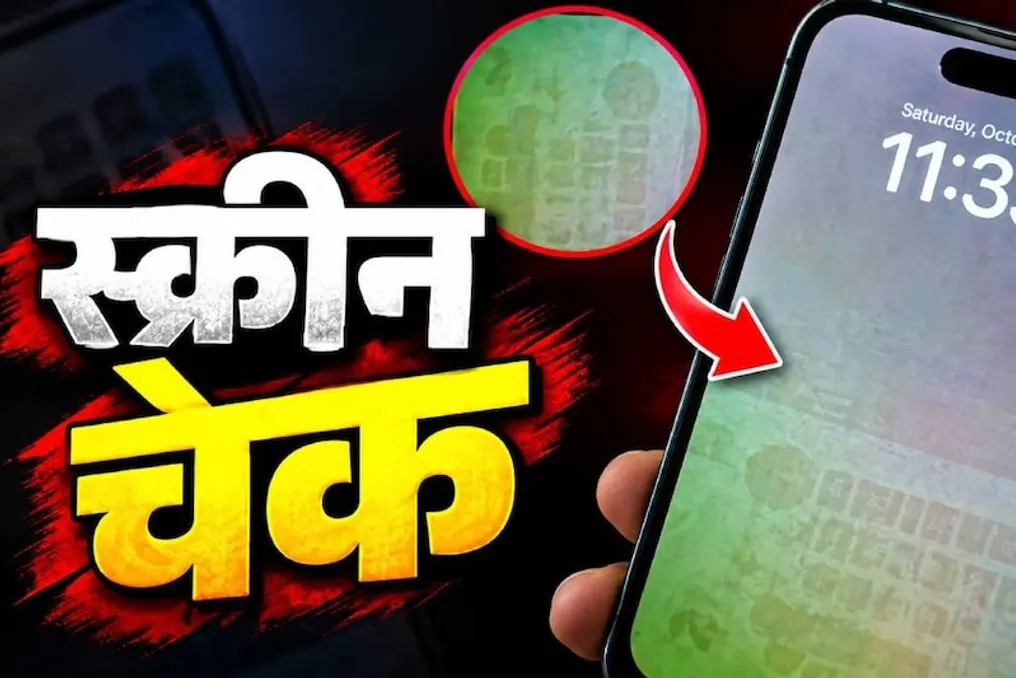
The market for used phones has been growing rapidly in recent years. There are numerous online platforms where old devices can be easily found, as well as offline markets offering such goods. If you plan to purchase a used phone, it is crucial to check the screen before buying. This method allows you to easily determine the device's display condition.
The display is one of the most important parts of a smartphone because this is through it that the user interacts with the device. If you do not pay attention to the screen when buying a used phone, you may receive a faulty device. Therefore, a thorough screen check before purchase is necessary. A simple way to check the screen is presented below.
When buying a used smartphone, you should check not only the body. A simple visual inspection will not reveal possible internal or screen malfunctions. You need to conduct a detailed screen test to ensure that the display functions correctly and has no defects or dead pixels.
What is screen burn-in?
With prolonged use of a phone, some display pixels may fail. This leads to the appearance of traces of old icons, text, or images on the screen. This phenomenon is called screen burn-in. Sometimes the burn-in is so minor that it is difficult to notice during normal use, so it must be checked separately when buying a used phone.
How to test a phone screen
If you are going to buy a used phone, be sure to check the screen along with the body. To do this, you can go to YouTube and run a video testing a white or gray screen. After the video plays, the entire phone screen will become one color. Now you need to look closely at the screen: if spots, areas of different colors, or traces of old icons are found, this may indicate a problem with the phone screen. Thanks to this simple test, you can get a more accurate idea of the condition of the used phone screen before purchasing, which will help avoid acquiring a device with a faulty display.