
WhatsApp discontinued support for older smartphones running Android 5.0 and 5.1
Read more
Aaj Tak
www.aajtak.in

WhatsApp discontinued support for older smartphones running Android 5.0 and 5.1

WhatsApp has announced the discontinuation of support for several outdated smartphones. According to a report by Wabetainfo, support for devices running Android 5.0 and 5.1 was terminated as of September 8, 2026.

Users of smartphones with Android 5.0 and 5.1 operating systems will receive a notification in the application after attempting to open the messenger. They will be prompted to update their device to the latest operating system version. If an update is unavailable, users are advised to purchase a new device.

WhatsApp previously announced this discontinuation of support back in April of this year. The application will now support a minimum version of Android 6.0 Marshmallow.

Wabetainfo noted in its report that old devices running Android 5 or earlier OS versions are still widely used in many countries, including India, Pakistan, and Brazil.

WhatsApp constantly introduces new features that are only compatible with specific Android versions. Many of these new features are not supported on overly old operating system versions. This is why WhatsApp has discontinued support for Android 5.0 and earlier versions.

Similar stories

WhatsApp is preparing a new feature allowing the connection of third-party AI agents for user communication
Read more
www.aajtak.in

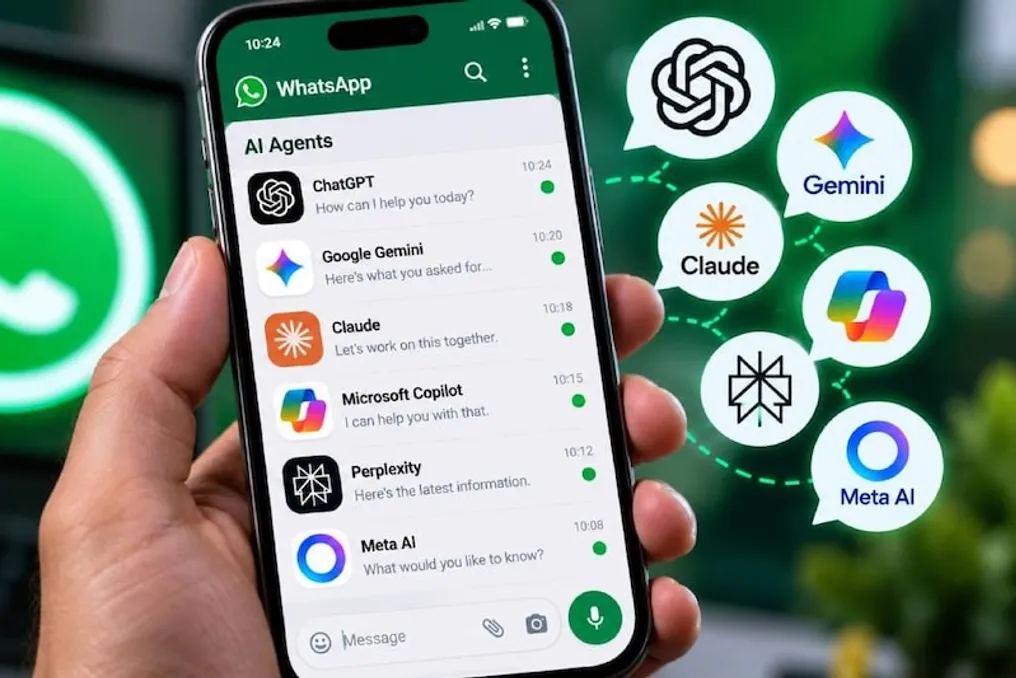
WhatsApp is preparing a new feature allowing the connection of third-party AI agents for user communication

WhatsApp, which users use daily to exchange messages, photos, and videos, is preparing to introduce a new feature that will be useful for those who actively use artificial intelligence (AI).

Thanks to this new capability, users will be able to integrate third-party AI agents and bots directly into the WhatsApp application. Previously, using any AI tool required opening a separate website or application.

According to reports, WhatsApp is developing a system that will allow third-party AI agents and bots to connect with the WhatsApp platform. This means that users will no longer have to switch between applications or websites if they need assistance from an AI agent during a regular chat.

Thus, the use of AI will not be limited only to WhatsApp's built-in features; various companies and developers will be able to integrate their AI agents into WhatsApp. Users will be able to converse with such an agent directly within the messenger, asking questions or assigning tasks.

After this feature appears, users are likely to see AI bots in WhatsApp that they can add according to their needs. After connecting, communication with the AI will proceed just like a regular conversation in WhatsApp.

However, this feature is still in preparation, and its exact mechanism of operation will become clear later. There is also an open question about which specific AI agents WhatsApp will support and what choice it will offer users.

The main advantage is reducing the need to constantly switch between different applications to use AI. Since WhatsApp is already an integral part of the daily lives of millions of people, having AI agents in it will make their use significantly more convenient.

As of now, no official release date has been announced for this feature for all users. However, if WhatsApp launches this feature on a wide scale, it could significantly change the approach to using both messengers and artificial intelligence.

Why does phone storage remain full after deleting files in WhatsApp
Read more
www.aajtak.in

Why does phone storage remain full after deleting files in WhatsApp

Smartphones are used for numerous tasks, from making calls and taking photos to using social networks. However, the problem of constant phone memory filling up often arises, leading to slowed performance and various difficulties.

Even though users delete files and photos from their phones, the memory may remain occupied. A significant reason for this can be the WhatsApp application, which saves many files on the device about which the user might not even know. Next, we examine how exactly WhatsApp fills up phone memory and what steps can be taken to solve this problem.

Many mistakenly believe that the majority of memory is taken up by photos and videos taken with the camera. However, media files exchanged via WhatsApp—including photos and videos—can also consume a significant amount of storage space.

When sending images and videos in high quality, users sometimes use the document method. Such files can be very large. Furthermore, numerous copies of media files received through WhatsApp may be saved on the phone.

Sometimes these files are not even displayed in the gallery, creating the impression that memory is not being freed after deleting photos and videos. If a large number of large files accumulate in WhatsApp, it can significantly use up phone memory, which can ultimately lead to its slowdown.

To free up space on the phone, you must first go to the WhatsApp settings. Then, select the 'Storage and Data' section and enter the 'Manage Storage' option. Here, the user can see how much memory WhatsApp occupies on their device, as well as view media files in different chats and large files.

It is recommended to check the chats where a large number of photos, videos, and other bulky files have accumulated. Necessary files can be deleted directly from here. This will prevent the need to delete important photos and videos from the phone while freeing up a lot of space by removing unnecessary large files accumulated in WhatsApp.

Additionally, to prevent rapid memory filling, you can configure the automatic download settings for media files in WhatsApp. By changing the 'Media auto-download' setting according to personal needs, you can protect your phone from excessive memory consumption.

Popular