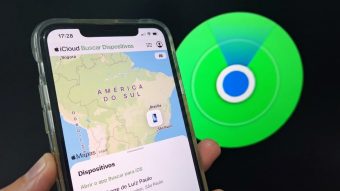
It is possible to track an iPhone through iCloud by accessing the Apple website via a computer or mobile browser. Using the Find My (iCloud Find) feature, the user can check the current location or the last recorded location of the device on an interactive map.
By activating the 'Lost Mode' feature, the stolen iPhone can be remotely locked. This immediately freezes the smartphone screen and displays a personalized message containing a contact number.
To start the process, use your device's browser to access icloud.com. Then, click 'Sign In' and log in to the Apple ID associated with the lost iPhone. Within the Apple ecosystem application panel, look for 'Find My' to begin tracking via iCloud.
If the system requests it, confirm your account authentication in the browser. On the left side of the screen, locate the list of devices linked to the Apple ID and select the missing iPhone to open the location map.
On this map, you will be able to see the position of the lost iPhone, the last time it was connected to the network, and the battery level. There is also an option to 'Play Sound,' in case the device is at home and cannot be found.
Lost Mode ensures the remote locking of the device, protecting personal data from third-party access. Furthermore, the tool displays a notification on the screen and sends location reports whenever the iPhone connects to the internet or when its location changes.
After identifying the device via iCloud, select the 'Lost iPhone' option in the panel to set up Lost Mode. In the window that appears, review the details on how protection works in the ecosystem and click 'Next.'
Next, enter a phone number that will be displayed on the lock screen, allowing anyone who finds the device to get in touch. Proceed by clicking 'Next' and write a direct message for the iPhone's lock screen, providing additional contact or return instructions.
Finish by clicking 'Activate' to confirm the lock, locking the phone with a password and preventing strangers from accessing photos and accounts. It is important to note that if the iPhone is recovered, you must access iCloud Find to deactivate the lock, selecting 'Lost Mode' and then clicking 'Turn Off Lost Mode.'
Although it is possible to locate someone else's iPhone, this cannot be done directly using one's own Apple ID. The owner of the lost device can access iCloud on another device using the Safari browser, logging into the account without needing two-factor authentication.
An additional alternative is Family Sharing, where devices registered in the group appear in the Find My tool. From there, simply check the last recorded location on the map to activate Lost Mode and protect the data.
It is possible to track an iPhone using Google Chrome by accessing the iCloud website through the Google browser on the smartphone. Another way to locate the lost device is by checking Google Maps Timeline, provided the account is synced, as this feature stores routes and shows location history.
Even with GPS disabled, iPhones from model 11 onwards can be tracked through the Find My network, using a power reserve to emit encrypted Bluetooth signals to other ecosystem devices. Thus, Apple can locate an offline iPhone through this collaborative and anonymous network, which is crucial for finding stolen phones that have been deactivated.
Google Locator cannot be used to track the iPhone in real-time, as the Apple ecosystem is distinct. The native Google tool operates exclusively on Android devices and compatible Bluetooth devices. The only indirect way to track via Google is by consulting Google Maps Timeline, but this feature requires prior activation and only shows visited locations, without live monitoring.
Tracking only by IMEI is not feasible, as this number serves only as a unique identifier for the device, and neither Apple nor carriers provide public tools for this. However, the IMEI is essential for filing a police report and blocking the device on mobile networks; websites promising tracking by code are mostly scams.
It is also not possible to track the iPhone just by the phone number, as this only identifies the line registered with the SIM or eSIM, without providing access to GPS or the Find My app network. Apple's features remain active even when the device has no network signal.
Attempting to recover the iPhone yourself presents significant risks to personal and legal safety. Tracking via the Find My tool should only be used as technical support for competent authorities. Therefore, the recommendation is to collect the tracking data, the IMEI code, and present them to the police in a police report, as only law enforcement has the necessary preparation to act safely and legally.