Choosing a tablet that comes with a keyboard is an advantageous option for those who need mobility without sacrificing functionality when working or studying. Certain models can meet daily demands, such as document creation, web browsing, and multitasking, and can even replace notebooks on occasion.
Tecnoblog has prepared a detailed guide presenting six tablets that already come with the keyboard accessory included, ranging from more basic options to more sophisticated models. In this guide, the pros and cons of each device are analyzed.
Galaxy Tab S11
The Galaxy Tab S11 features 12 GB of RAM and 256 GB of storage, with the capacity to expand space up to 2 TB via a microSD card. Equipped with the MediaTek Dimensity 9400+ processor, it provides high performance for both browsing and multitasking, in addition to supporting heavy editing applications.
Samsung includes the keyboard case and S Pen in the box, which allows access to Samsung DeX mode, enabling the tablet to function like a notebook. This feature offers up to 18 hours of autonomy and converts the Android system into a work environment with productivity-optimized features, such as multiple resizable windows and shortcuts.
Compared to the other listed tablets, the Samsung model presents a more refined software ecosystem for productivity purposes and greater processing power. However, its cost is higher than that of the other mentioned brands.
Huawei MatePad 11.5
The Huawei MatePad 11.5 has 6 GB of RAM and 128 GB of storage. Its 11.5-inch screen displays 2K resolution and an update rate of up to 120 Hz, ensuring excellent sharpness when watching videos and fluidity during browsing.
This device comes with a smart keyboard, which facilitates the transition between use as a tablet and an experience similar to a notebook. Furthermore, it offers the WPS Office package as a native alternative to Microsoft Office, integrating productivity features directly into HarmonyOS.
Overall, the Huawei tablet boasts a metallic finish and a battery that lasts up to 10 hours of video playback. A notable drawback of the brand is the absence of native Google services, which forces the user to seek alternative solutions to access certain applications.
Lenovo Idea Tab
The Lenovo Idea Tab is configured with 8 GB of RAM and 128 GB of storage, with the possibility of increasing space with a microSD card up to 1 TB. Its MediaTek Dimensity 6300 processor is suitable for daily tasks, such as social media and internet browsing.
However, according to tests conducted by Tecnoblog, the Idea Tab shows difficulties running very heavy games or video editing software, such as CapCut.
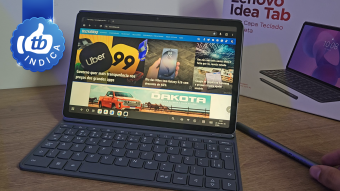
The great differential of this tablet is the inclusion of a case, magnetic keyboard, and the Lenovo Tab Pen, forming a complete set for notes, typing, and increased productivity, serving as a substitute for notebooks. The 11-inch screen has a 2.5K (2560 × 1600) resolution and a 90 Hz refresh rate, providing good color saturation and high quality in movies and series. Despite this, its maximum brightness is only 500 nits, which can hinder visibility in brighter environments.
Vaio TL12
The Vaio TL12 focuses on configurations with 8 GB of RAM and up to 256 GB of storage, using the mid-range UniSOC T820 processor with integrated 5G connectivity, allowing for efficient multitasking execution.
The kit includes the protective case with keyboard and the VAIO Pen, ideal for professional use, whether in document editing or design activities. It stands out with its 12.6-inch AMOLED screen with a resolution of 2560 × 1600 pixels (2.5K), offering ample space to simultaneously work with spreadsheets and applications.
Vaio TL10
In direct comparison with its predecessor, the Vaio TL12 improved screen quality by switching from IPS LCD to AMOLED, gained processing improvements, and began supporting 5G networks. A disadvantage, however, is the total weight of the unit, which reaches 617 grams.
Vaio TL10
The Vaio TL10 offers 8 GB of RAM and 128 GB of internal storage, powered by the octa-core UniSOC T616 processor. The factory kit contains the magnetic keyboard, which uses physical pin connections, but does not include the pen. This feature transforms the system into an environment suitable for text production and quick file editing, featuring a 10.4-inch IPS screen (1200 × 2000 pixels, 2K) and a 7,000 mAh battery.
When compared to the Positivo Vision Tab 10, the Vaio model features a higher definition screen and double the RAM for application switching. The weak point lies in the lack of 5G connectivity and the moderate performance of the chipset in media rendering and heavy gaming tasks.
The Positivo Vision Tab 10 is aimed at basic consumption and less demanding office tasks. It comes with 4 GB of RAM and 128 GB of expandable storage via microSD. This model allows access to emails, online documents, and note-taking apps with a case that includes a keyboard, but uses a basic processor (Unisoc T606). Although it allows multitasking, this may be limited due to the low amount of RAM.
The Positivo Vision Tab 10 incorporates 4G mobile connectivity and a 10.1-inch HD IPS screen with a resolution of 1280 × 800 pixels. Compared to the other models, the Positivo option prioritizes accessible cost-benefit, sacrificing features to reduce the final price.
It is essential to check the technical specifications of each model before purchasing, as the cited devices cater to different usage profiles. The Lenovo Idea Tab is presented as an economical alternative that already comes with a keyboard and pen, offering 8 GB of RAM and the Dimensity 6300 processor for multitasking, in addition to a high-resolution screen. It is recommended for studies, browsing, and document work, although hardware limitations affect gaming and video editing.
It should be noted that iPads are not supplied with a keyboard in the box; Apple sells compatible keyboards, such as the Magic Keyboard, separately.
Using a tablet with a keyboard brings significant benefits, especially in activities such as writing articles, sending emails, browsing, video conferencing, and document editing, depending, however, on the operating system and available applications.
In the case of the Galaxy Tab S11, for example, Samsung DeX provides an interface focused on multitasking and use with a keyboard and touchpad, bringing the experience closer to that of a computer.
It is possible to use Bluetooth keyboards on most tablets. There are also models with USB-C connection. The main distinction is that manufacturer-specific keyboards may offer better integration with the system, including fitting, shortcuts, and touchpad.
Suitability depends on the user profile. The keyboard is more indicated for tasks such as spreadsheets, emails, and text, while the pen is more useful for notes, drawings, and markings in documents. For students or professionals, a model that offers both accessories may be more versatile in daily life.