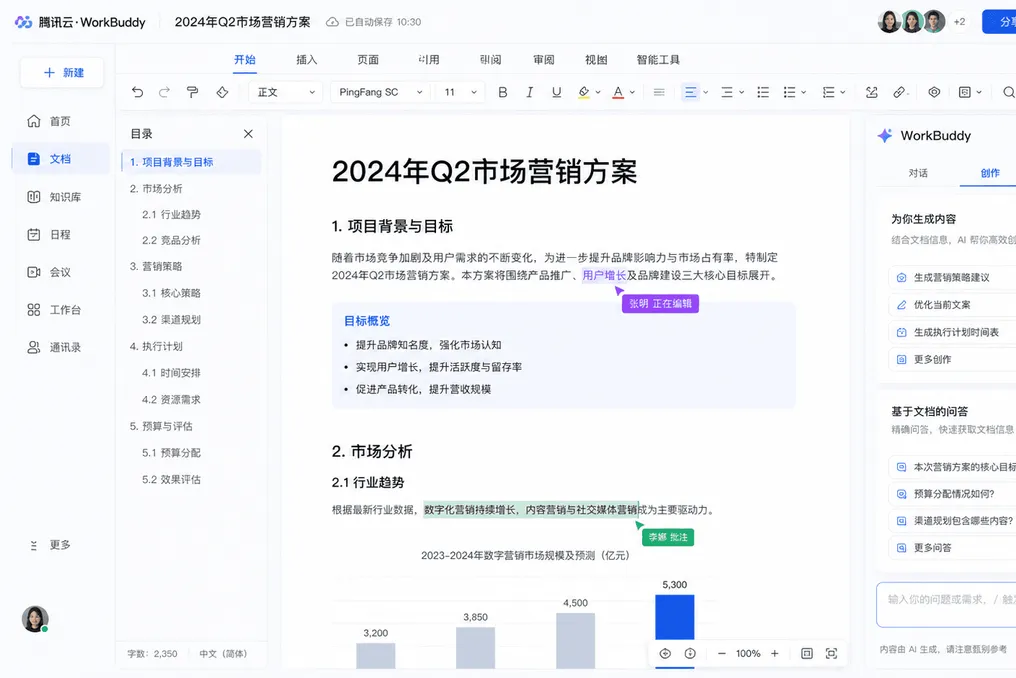
Tencent WorkBuddy has released version V5.3.5 with Tencent Docs integration, enabling collaborative editing using artificial intelligence directly within office documents. This feature supports both local Office files and cloud documents by utilizing contextual multimodal intelligence.
How Dual Writing Works
The Human-Agent Dual Writing feature was launched on July 30th alongside Tencent Docs. Users can select any segment in Word, Excel, PPT, or Markdown files and issue a command in natural language. The AI makes changes only to the selected area, preserving the surrounding content and formatting. This marks a shift from generating autonomous results to collaborative editing within the document.
Target Modification Capabilities
The interaction model is based on precise selection and targeted correction. Users can specify edits such as improving a paragraph with an emphasis on user growth, splitting a dense slide into multiple pages, adding a summary at the end while fully preserving the layout, or analyzing a selected range of data to identify trends and generate visualizations. The AI operates exclusively within the selected area, which helps maintain the author's organizational structure, chosen stylistic decisions, and previous edits. This approach solves a major problem with AI-based tools that overwrite user work when generating a complete document overhaul. WorkBuddy supports both types of files: local Office and cloud Tencent Docs, covering the most common office workflows.
Technical Architecture and Functionality
The technical structure combines WorkBuddy's agent capabilities with the Tencent Docs rendering engine. When a user selects an area and enters a command, WorkBuddy interprets the semantic intent, analyzes the selected content, generates the necessary changes, and applies them via the Docs API while preserving formatting. The system is capable of processing multimodal content, including text, tables, charts, images, and page layouts. Specifically, for Excel, the AI can perform data analysis, extract trends, detect anomalies, and create visualizations directly within the table context. For PPT, the AI can split, merge, reformat, and restructure slides based on content density and logical flow analysis. The multi-turn editing capability allows for sequential refinement of the document, where each change is based on previous revisions.
Product Positioning in the Market
The release of this tool positions WorkBuddy as an additional layer of AI on top of standard office software. The human-agent dual writing feature presents AI as a co-author that supports human oversight. This aligns with the general trend of moving from task automation tools to AI employees, where value shifts from automation to augmentation of human capabilities. WorkBuddy bets that the winner among office AIs will be the tool with the most seamless integration.