A photographer's routine is extremely demanding, as besides producing high-quality images for events, parties, and portraits, the professional needs agility to meet deadlines and manage a large volume of requests.
Workflow Solution
Evoto AI emerges as software intended for professional photographers, aiming to solve this complex equation. Its goal is to elevate photo quality without introducing unnecessary complications into the editing process, using artificial intelligence as its main ally.
This post-production software is designed to serve professionals in various niches, such as weddings, events, portraits, and product photography. It accelerates several phases of the workflow, including applying masks, correcting flaws, batch editing, and color synchronization.
Advanced Retouching Features
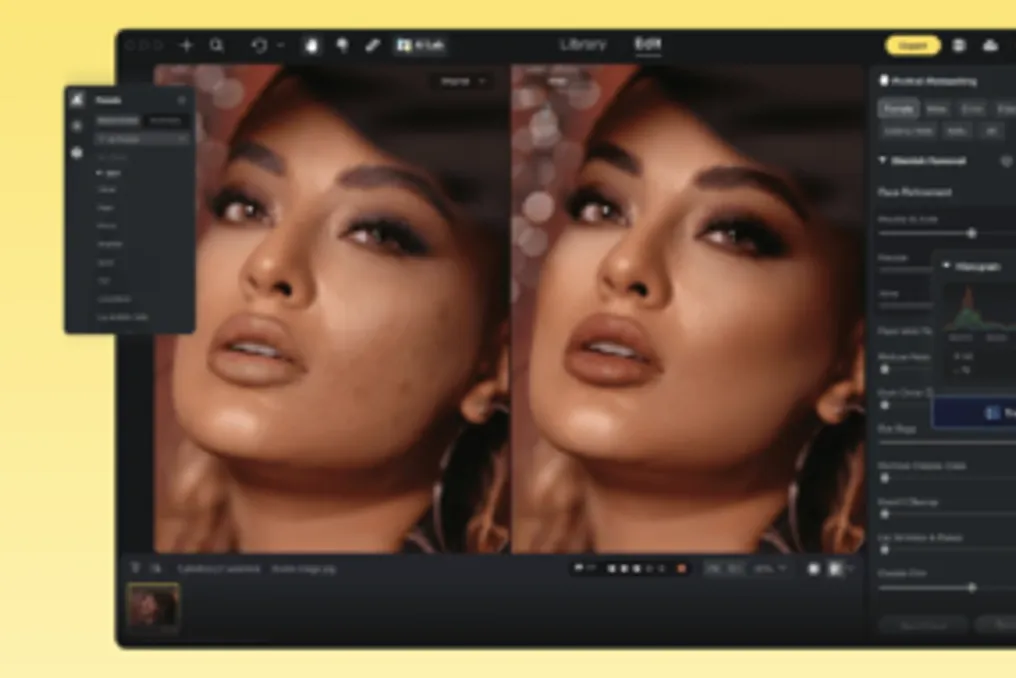
Developed by Truesight Technology, the program employs AI to refine details and perform retouching. Its capabilities include correcting skin imperfections, such as wrinkles, dark circles, and pimples; removing glasses reflections; de-wrinkling clothing; and eliminating unwanted elements from the background.
Additionally, Evoto AI assists in photo selection by identifying duplicates or problematic images, and allows choosing the best shot among multiple clicks of the same scene. Edits can be performed in batches, assisted by presets and coloring tools.
Appearance and Detail Retouching
The software has robust tools for aesthetic retouching, especially useful for portraits, weddings, and family photos. The AI Portrait Retouching module improves the appearance of skin, hair, teeth, and makeup. The Blemish Remover provides natural skin retouching, smoothing acne, pimples, and dark circles, while Skin Retouching evens out the tone and accentuates contours. There are also specific tools to treat freckles, expression lines, and wrinkles.
Aesthetic improvements go beyond portraits. The AI Teeth Fixer uses AI to enhance smiles, enabling the removal of orthodontic braces, teeth whitening, gum reduction, and smile alignment. The AI Stray Hairs Remover automatically detects and erases misplaced hairs, eliminating frizz.
Clothing and Scene Enhancement
Regarding clothing and accessories, the Wrinkle Remover identifies and smooths creases and wrinkles in fabrics without altering the garment's fit. The Glasses Glare Removal resolves the annoyance of light reflections on eyeglass lenses. For scenes, the AI Magic Eraser allows removing objects, dirt, or people from the background with a simple touch. The Backdrop Cleaner helps standardize colors and eliminate creases in backgrounds, benefiting portrait or commercial work.
Workflow Optimization and Consistency
Designed to save time, Evoto AI includes AI Photo Culling, which analyzes large volumes of images and automatically discards those that are blurry, have closed eyes, are poorly exposed, or are duplicates. For greater agility, the AI Batch Editor applies presets to multiple photos simultaneously, maintaining consistency by automatically identifying subjects. This tool can even crop and remove backgrounds from multiple images at once.
To ensure visual uniformity, AI Color Match creates a color profile based on a selected image and applies it to the others. The tool catalog is vast, covering body adjustments (waist, hips, arms, legs, height, and muscle contour) and facial adjustments (shape, eyebrows, nose, and chin), in addition to digital makeup with ready-made presets. The software also offers tattoo removal, red-eye correction, and elimination of unwanted people.
Technical Features and Practical Tests
Evoto AI supports direct camera connection to the computer in tethered mode and provides specific adjustment profiles for different camera models, along with a vast library of presets. Tests demonstrated the effectiveness of Blemish Remover and Skin Retouching, which managed to eliminate spots, acne, dark circles, wrinkles, and even smooth double chins, all controlled by sliders, allowing for natural retouching without texture loss, without the need for masks or brushes.
Another test showed that glasses reflection removal was performed without area delimitation, only with control via slider. The Wrinkle Remover demonstrated satisfactory results on a white t-shirt, resolving significant creases. The AI Magic Eraser removed a lamp and a wall hook, preserving the outline of the clothing. Finally, AI Color Match unified the skin tone and brightness coherence between photos taken under different lighting conditions.
Business Model and Availability
Evoto AI operates under a credit system for image export, although downloading and editing are free. Payment can be made through an annual or single subscription. Annual plans offer packages from 800 to 24,000 credits, with benefits such as support for six devices and cloud storage. Single purchases range from 200 to 3,600 credits, valid for two years and limited to two devices. It is important to note that the software requires an internet connection to function, as part of the processing occurs in the cloud.
Currently, the software offers a 25% discount with the coupon TECNOBLOG until July 23, which also includes over 95 professional presets and free backgrounds. Evoto AI is available for download on macOS and Windows, allowing users to explore the editing features even without owning credits.