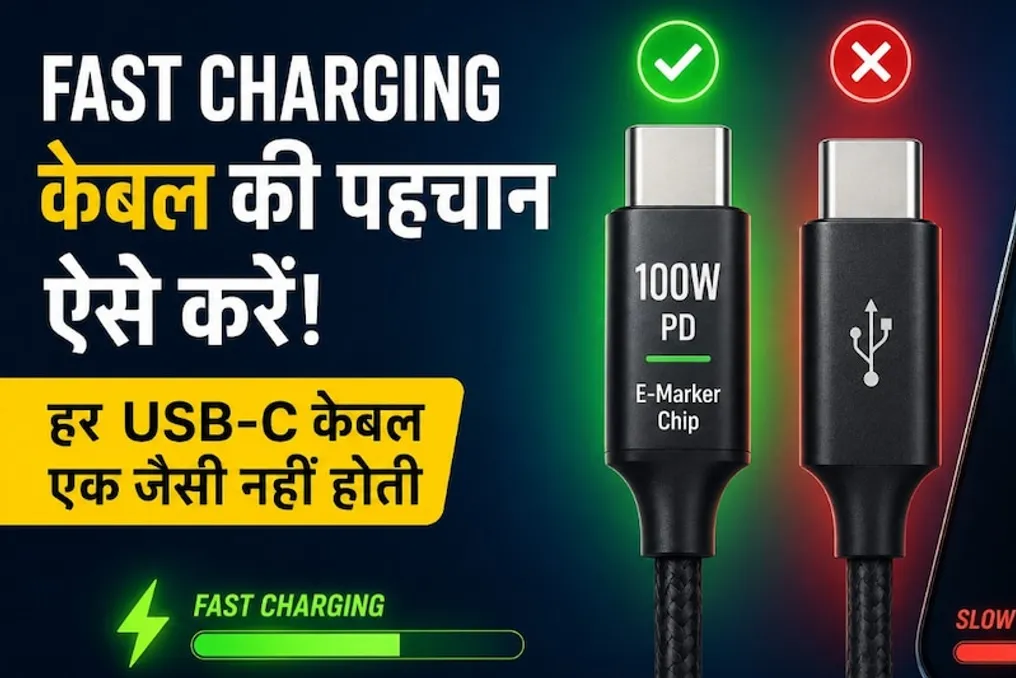
Modern smartphones are often equipped with fast charging capabilities, supporting powers from 33W up to 100W and beyond. However, sometimes, despite having a powerful charger, the charging process is very slow. Most users mistakenly blame the adapter for this, whereas a frequent cause is the quality of the charging cable being used. Cheap or low-quality cables can slow down data transfer and reduce charging speed.
Understanding USB-C Capabilities
Visually, all USB-C cables may look identical, but their functionality varies greatly. Some are designed exclusively for standard charging, while others can handle high charging speeds and large power volumes. It is important to understand that USB-C only denotes the cable's form factor, not its electrical power. Consequently, two cables with the same connector can have different maximum powers—for example, one might be up to 15W, and the other up to 100W.
The Importance of Power and the E-Marker Chip
If your phone comes with a 67W or 100W charger, using an inexpensive or old cable can prevent you from reaching the full charging speed. In such cases, the cable limits performance even if the charger is working correctly. When purchasing a cable, you must pay attention to the specified power: good USB-C cables often indicate 60W, 100W, or 240W. For standard smartphone charging, a quality 60W cable is sufficient, but if you use an 80W, 100W, or higher charger, or charge a laptop via USB-C, it is recommended to choose a 100W-rated cable.
Cables capable of transmitting more than 60W are equipped with a special microchip known as the E-Marker. This microchip serves to inform both the charger and the phone about the maximum power the cable can safely handle. The absence of this chip causes devices to automatically reduce charging speed for safety reasons, which explains why a 100W charger might not operate at full capacity.
Compatibility of Charging Technologies
Even if you purchase a 100W cable, this does not guarantee that your phone will charge at that speed. It is critically important that the phone, the charger, and the cable support the same charging technology. Different manufacturers use their own protocols, such as USB Power Delivery (PD), as well as proprietary systems like SuperVOOC, HyperCharge, or TurboPower. If these technologies do not match, the charging speed will inevitably decrease.
Factors Affecting Efficiency
One should not automatically assume that longer cables are better. Although the convenience of long cables (2 or 3 meters) is obvious, they can lead to increased energy loss. While some manufacturers compensate for this with improved conductors, very cheap long cables can reduce charging speed.
What to Check When Buying
When buying a cable online or in a store, one cannot rely solely on the label 'fast charging.' You must look for an explicit indication of power, such as 60W, 100W, or 240W. If 100W or higher power is indicated, it is desirable that the description mentions the E-Marker. Furthermore, reputable manufacturers provide information on certification, such as USB-IF. The absence of this data is a reason to consider alternative options.
It is not necessary to buy the most expensive cable, but you should avoid extremely cheap and unbranded models, as they may fail quickly and not deliver the advertised speed. If you regularly use fast charging, investing in a quality cable will pay off in longevity and stable operation.
Diagnosing Charging Problems
If you notice that your phone, which used to charge in 30–40 minutes, now requires significantly more time when using the same charger, the first step should be to check another, reliably high-quality cable. If the charging speed recovers after replacing the cable, the problem was indeed with the old cable, not the charger itself.
Choosing the Optimal Cable
For users who only charge a smartphone, a quality 60W USB-C cable from a well-known brand is usually sufficient. However, if you plan to use the cable in the future to charge laptops or tablets, it is better to purchase a 100W model. This will prevent the need to buy a new cable when upgrading gadgets. In conclusion, charging speed today depends not only on the adapter but also on the quality of the cable; therefore, when choosing, attention should be paid not only to length or color but also to power parameters, technology, and overall quality.